designer/engineer

Wicked good design for wicked problems.

Featured Work

PROJECT FELINES

PROJECT FELINES

The Alzheimer’s field spent billions clearing amyloid plaques from brains that kept declining. FELINES is what happened when I stopped accepting that narrative and started tracing upstream: iron dysregulation, ferroptosis, vascular failure, across six neurodegenerative diseases that enter through different doors but break down the same way.

GOINVO WEBSITE

GOINVO WEBSITE

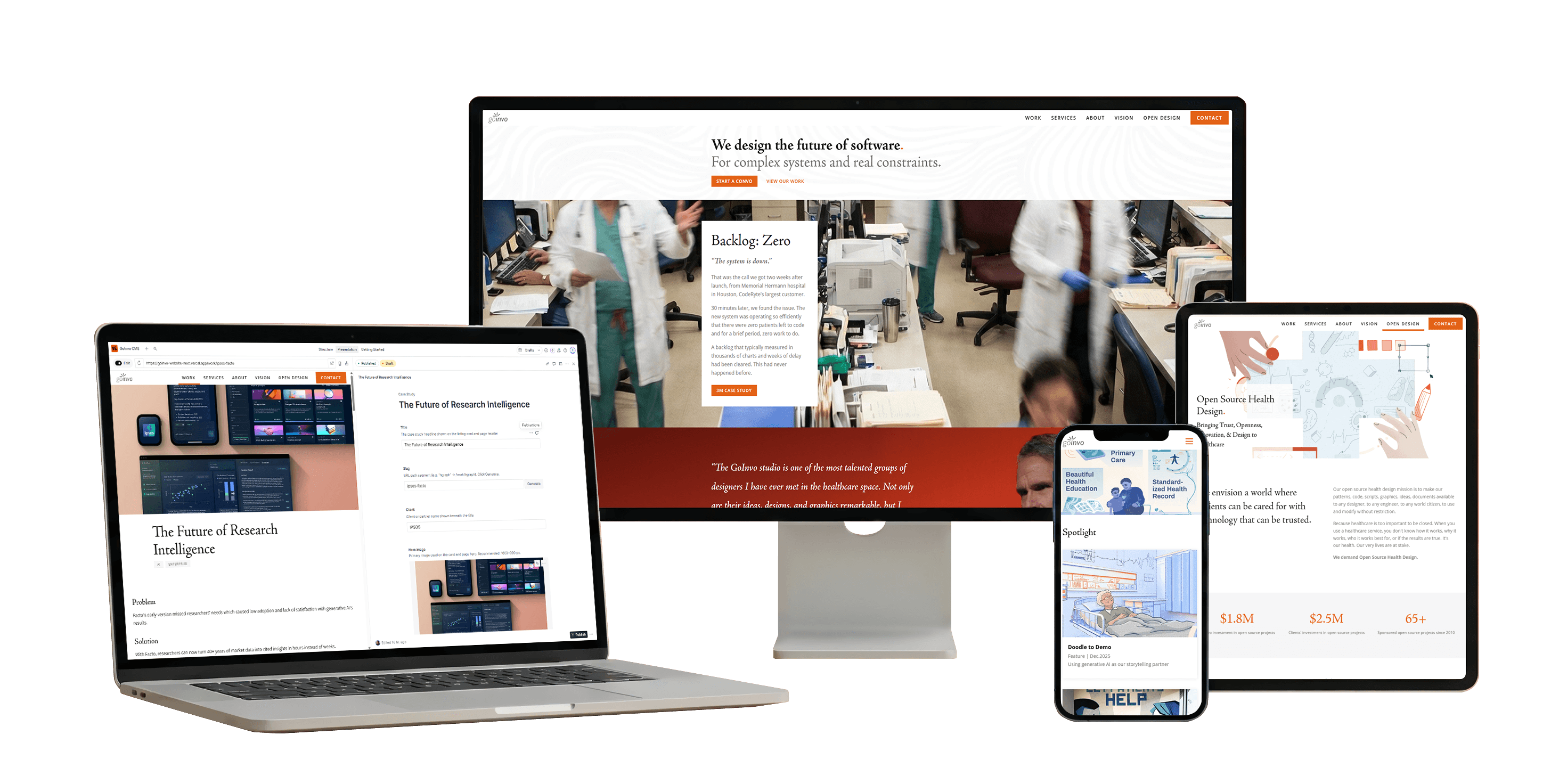
Migrating a healthcare UX studio off aging Gatsby infrastructure onto Sanity CMS, animated page transitions, and accessibility-first architecture. Nine document types, card-morph transitions, and a content pipeline that lets non-technical editors publish without touching code.

WRITROSPECT

WRITROSPECT

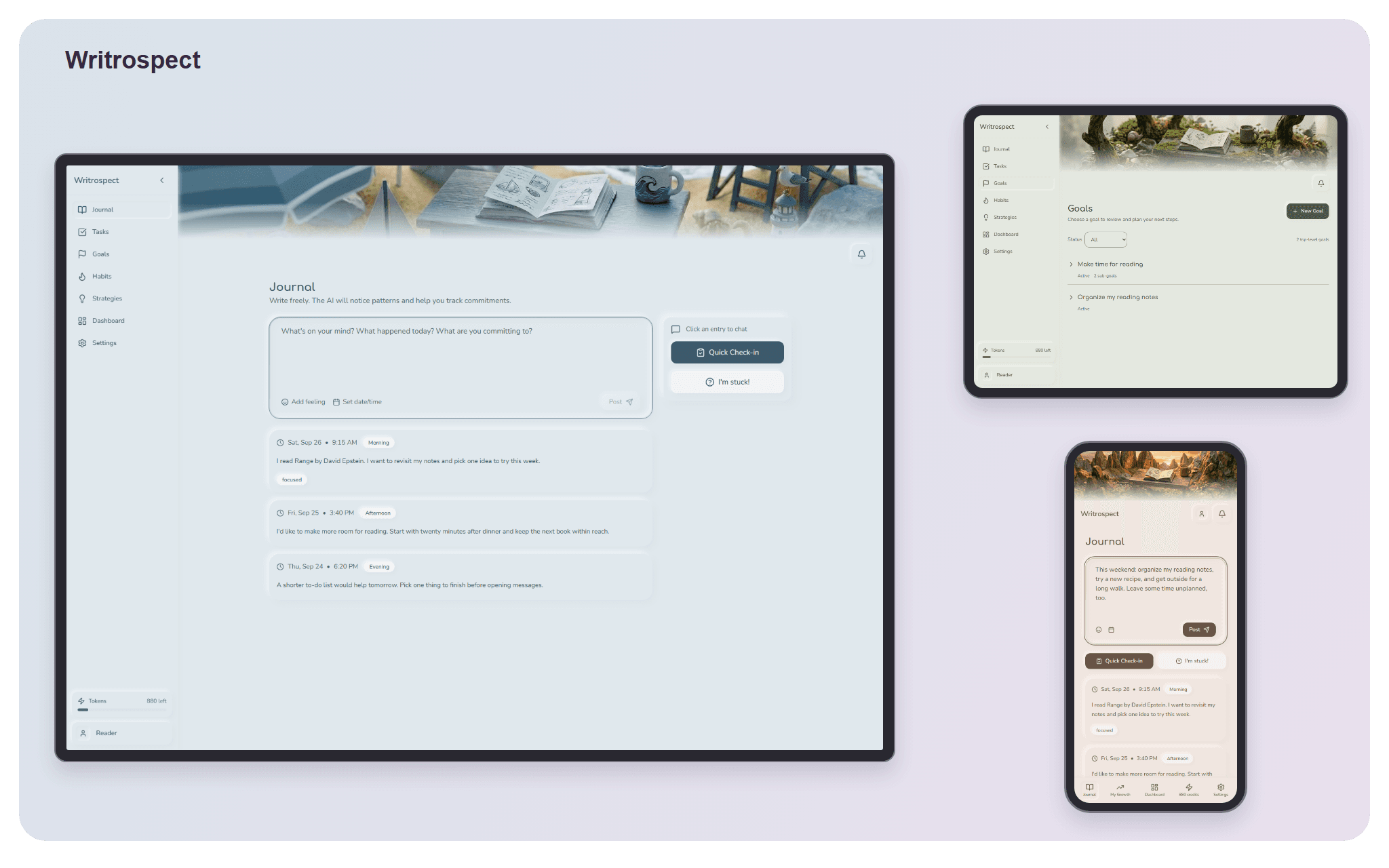
An AI-assisted journaling tool that solves the blank-page problem. Built on neuroscience research about why people abandon commitments to themselves, with a prompt architecture that adapts to what you actually need rather than loading everything at once.

RENDOMAT

RENDOMAT

A programmatic video studio built at GoInvo. Turns structured content into multi-platform video with professional motion design, replacing a manual production pipeline that took a full day per video with an automated system that renders in minutes.

PHYLACTORY

PHYLACTORY

100,000+ concurrent units in a fantasy game that fuses factory management with real-time strategy. Built a custom Entity-Component-Space system from scratch in Godot 4 with C++ and GDExtension, hand-crafted every sprite and tileset in Aseprite, and designed twelve interconnected game systems such as energy grids, trains, pipes, and formation AI.

Case Study

Give the editors
the keys.

Migrating GoInvo’s website off aging Gatsby infrastructure and rebuilding it around three things: a Sanity CMS that lets non-technical editors publish independently, an animation layer with card-morph transitions and scroll-driven reveals, and accessibility as a first-class constraint, not an afterthought. Live and serving real traffic.

View Project
Next.js 16React 19TypeScriptSanity CMSTailwind CSS v4Framer MotionGROQView Transitions API
01

The Problem

GoInvo is a healthcare UX studio whose Gatsby site had become a liability on multiple fronts. Build times stretched to minutes as the plugin ecosystem stagnated. Every content update required a developer to write JSX, commit to Git, and wait for a deploy. Accessibility was inconsistent. Animations were absent. The studio’s writers and designers were locked out of their own site.

The brief had three pillars: a CMS that lets editors publish independently: case studies with rich media blocks, vision articles, team bios, job postings; an animation layer that matches the studio’s design quality; and accessibility built into the foundation, not bolted on after launch. I wrote migration scripts to port existing content, set up a collaborative editing environment with AI-assisted workflows for incorporating interactive elements and styled explorations from Figma, and built custom components that let the team publish without touching code.

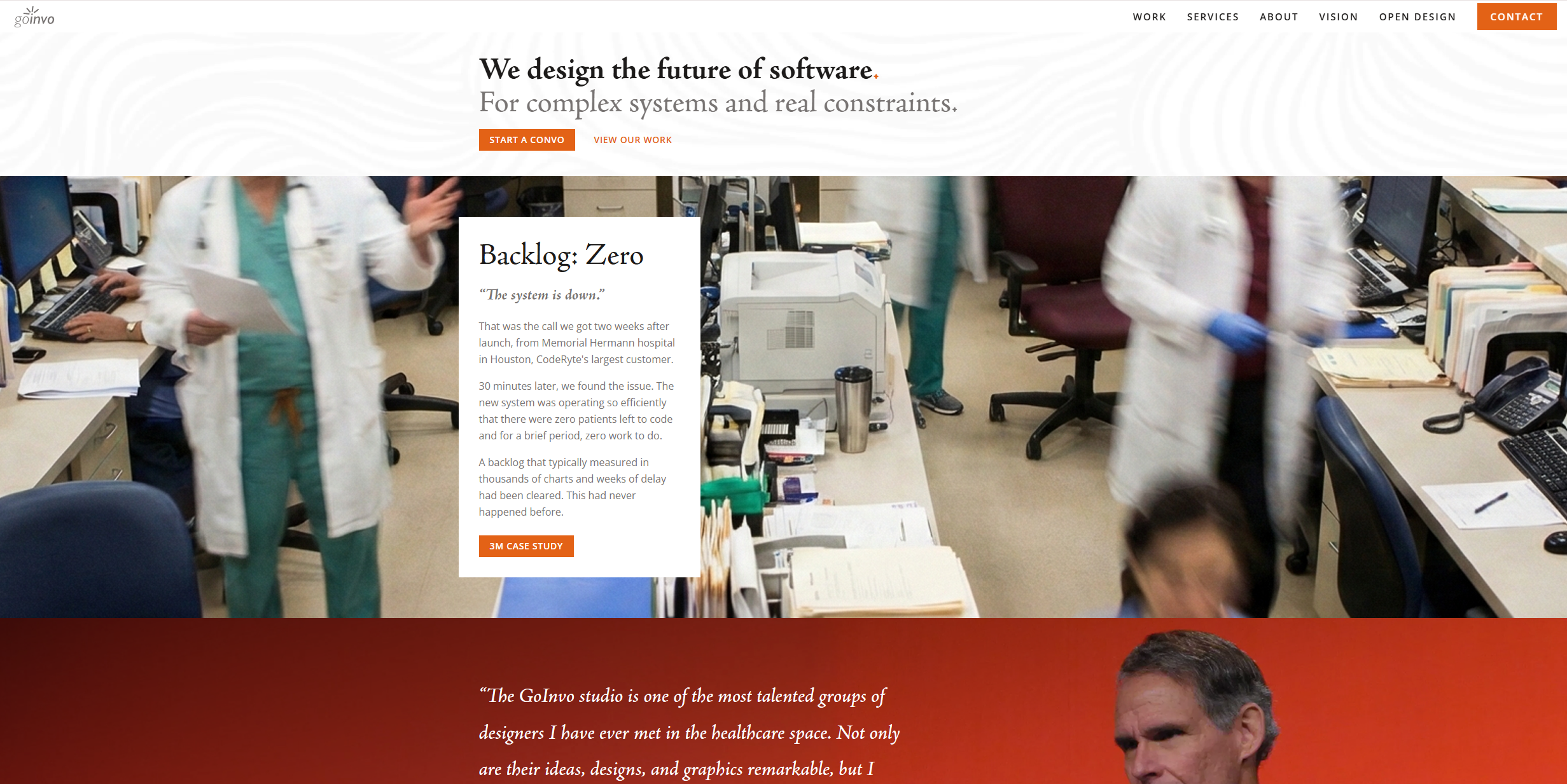
GoInvo homepage showing hero section, featured case study, and client testimonial

The rebuilt homepage: full-bleed photography, featured case study cards, and a client testimonial ribbon.

02

Architecture

Content flows from Sanity Studio through GROQ queries into React Server Components, which are statically generated at build time with incremental revalidation for updates. Only interactive elements (animations, forms, the card morph system) hydrate on the client.

Why Next.js 16 App Router: React Server Components eliminate client-side JavaScript for content-heavy pages. Streaming and partial prerendering let the shell load instantly while dynamic content hydrates progressively. Nested layouts made the persistent header/footer with animated page transitions straightforward.

03

Sanity CMS

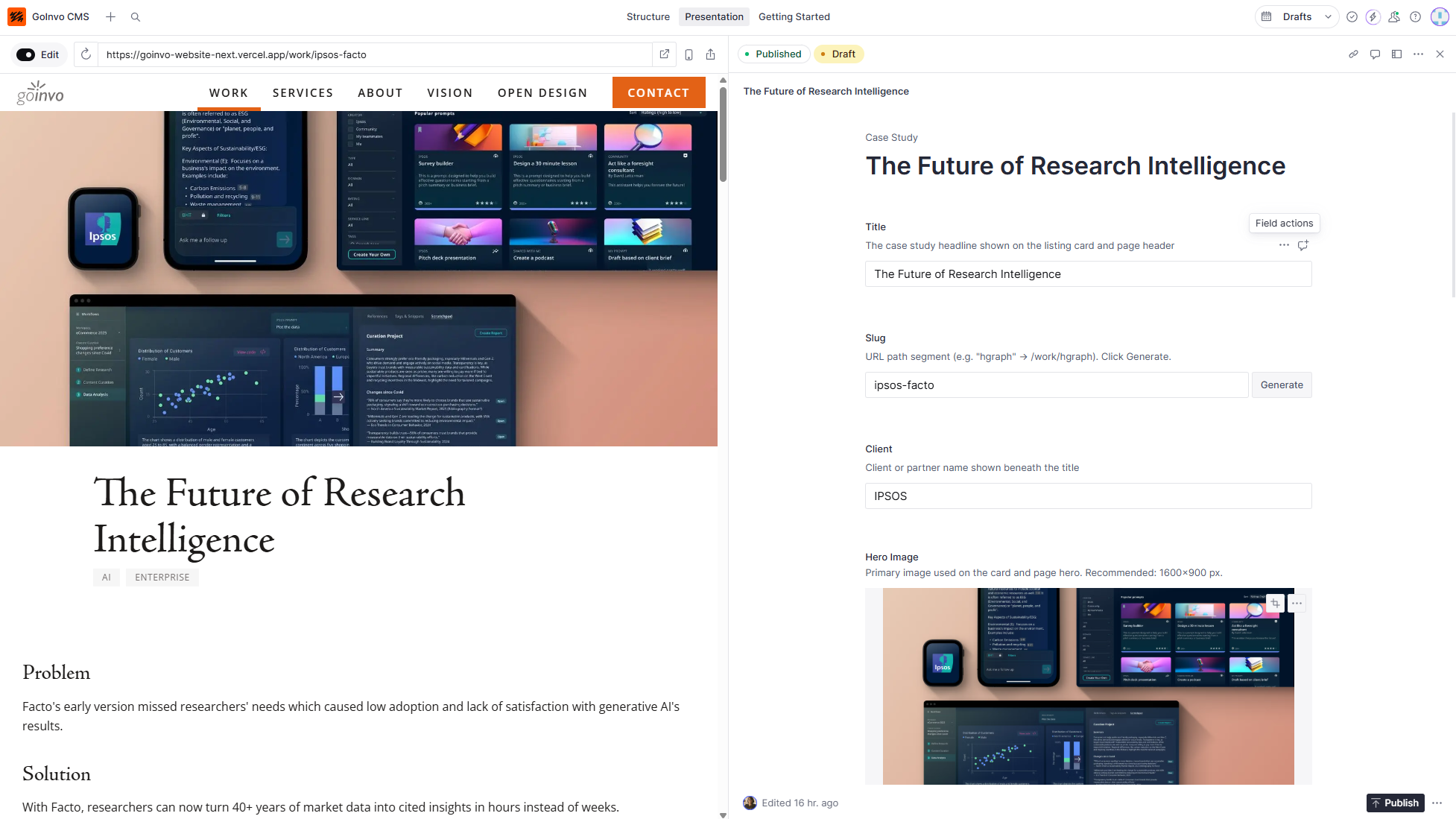
9 document types model the studio’s content. Portable text fields support 8 custom block types: image blocks with captions, pull quotes, results grids, full-bleed sections, video embeds. Each page has a co-located GROQ query that fetches exactly what it needs, no over-fetching.

Sanity Studio showing side-by-side live preview and content editing for a case study

Sanity Studio with live preview: editors see their changes reflected on the actual site in real time.

Document TypeDescription
Case StudiesPortfolio projects with portable text body, hero images, and tag taxonomy
Vision ArticlesLong-form thought leadership with rich media blocks
Team MembersBios, headshots, roles, and social links
ServicesCapabilities with descriptions and featured case study references
TestimonialsClient quotes with attribution and optional project link
ClientsLogos and metadata for the client grid
Job OpeningsPosition listings with requirements and application links
Site SettingsGlobal config: nav, footer, SEO defaults
HomepageFeatured projects, hero content, section ordering
04

Page Transitions

The core challenge: React’s App Router immediately swaps page content on navigation, which destroys exit animations. The solution is a FrozenRouter that freezes the LayoutRouterContext during exit animations, keeping the old page visible while it fades out. Framer Motion’s AnimatePresence mode="wait" orchestrates the sequence: exit old, enter new.

When a user clicks a case study card, the card’s image morphs from its grid position to a full-width hero. This creates spatial continuity: the user sees the content “open” rather than jump-cut to a new page.

Card-morph transition in action: the case study card expands into a full-width hero, maintaining spatial continuity.

TimeEventWhat Happens
0msCard clickedRect captured, overlay appears, morph begins
550msMorph completeImage at full-width hero position, router.push() fires
~700msPage enteringAnimatePresence enter animation begins on new page
950msHandoffOverlay removed, new page’s hero image takes over
05

Animation System

A single reusable Reveal component drives all scroll-triggered animations. Six animation styles cover every use case, from gentle content fades to dramatic clip-path reveals. The native View Transitions API complements Framer Motion for cross-document hero/title persistence.

Reveal Styles

slide-upBody text, cards, default entrance
slide-left / slide-rightPull quotes, sidebar content
scaleImages, featured media
clip-upHero images, dramatic reveals
clip-leftSection dividers, accent elements

Easing & Timing

Page enter/exit0.35s · [0.4, 0, 0.2, 1]
Scroll reveals0.6s · [0.25, 0.1, 0.25, 1]
Card morph0.55s · [0.32, 0.72, 0, 1]
Section entrance0.6s · [0.25, 0.1, 0.25, 1]
06

Results

18

Pages built

9

Sanity document types

8

Custom portable text blocks

11

Client components (of 60+)

The site is live and in active use by the studio. Content editors publish case studies, vision articles, and team updates without developer involvement. Pages load with zero client-side JavaScript for static content, hydrating only the interactive layer.

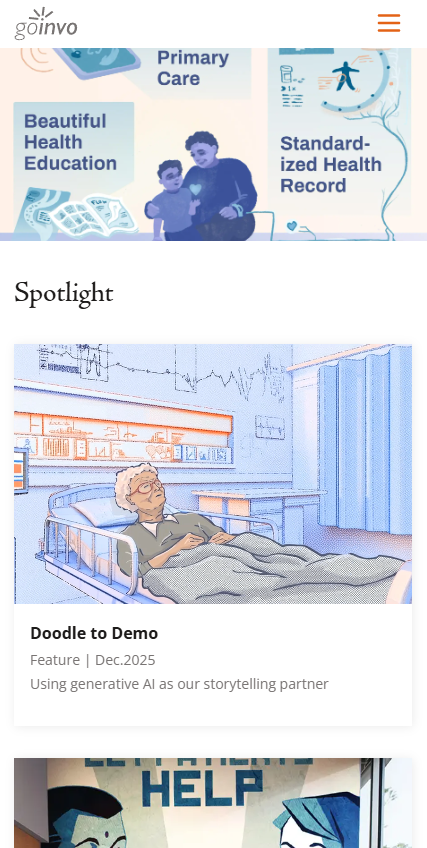
GoInvo Vision page on mobile showing responsive layout with spotlight cards and featured articles

The Vision page on mobile: responsive typography, stacked spotlight cards, and scroll-driven animations adapt gracefully to small screens.

07

What I'd Do Differently

FrozenRouter was the non-obvious insight.

React’s App Router immediately swaps page content on navigation, destroying exit animations. Freezing the LayoutRouterContext during exit keeps the old page visible while it fades out. This took the longest to debug.

Throttle Sanity’s live events early.

Without debouncing, real-time editing events fire on every keystroke, causing render storms. The custom DOM event + 1.5s debounce pattern should have been day-one architecture, not a later fix.

Graceful degradation unlocks CI.

Making the Sanity client return empty arrays when unconfigured (instead of throwing) let the site build in any environment without CMS credentials. Simplified development and deployment pipelines considerably.

About

Someone didn't give up on me.
That's why I build.

There is no definitive formulation of a wicked problem.

When I was three months old, I had intestinal volvulus. I wouldn’t stop crying, every doctor had a different explanation, and my parents kept looking until they found one who could see what the others missed.

The choice of explanation determines the resolution.

That persistence saved my life. It also gave me something I’ve carried ever since: the recognition that how you frame a problem determines whether you can solve it at all.

Every wicked problem can be considered a symptom of another problem.

I don’t just say “wicked” because I’m from Massachusetts. In 1973, Horst Rittel and Melvin Webber described wicked problems: the kind where the crying is a symptom of something deeper, and treating the surface never reaches the root.

Every wicked problem is essentially unique.

I started where a lot of CS grads start: writing Perl scripts for an escalation engineering team at Dell EMC, then two jobs in the gaming industry building things that were complex, fast, and fun. But games ship patches. The problems I kept gravitating toward were the ones where you don’t get to patch. I earned a Master’s in bioinformatics because I wanted to bring engineering somewhere the problems don’t repeat: healthcare, government, regulated systems where every deployment is its own context and every patient is their own case.

Wicked problems do not have an enumerable set of potential solutions.

I joined a small studio designing for healthcare and government because the solution space is never closed. There’s no dropdown menu of correct answers. You design, ship, learn, and revise, knowing the next version will be different, not because the last one failed, but because the problem shifted underneath you.

Every solution is a “one-shot operation”; every trial counts.

In regulated environments, every release matters. There are no sandbox deployments when someone’s care depends on the system working. That weight is something I chose, not something I stumbled into.

The planner has no right to be wrong.

When you build software for medical contexts, you carry a specific accountability. The system you ship becomes part of someone’s care, and “move fast and break things” is not an option when the things that break are people.

Wicked problems have no stopping rule.

Over the past several years, that same instinct has pulled me toward problems with no finish line. I started researching neurodegenerative disease on my own, not because I expected to solve it, but because I couldn’t stop looking once I started seeing what others were missing. That’s how I work on everything: once I care about a problem, there is no clean stopping point, only the next question.

There is no immediate and no ultimate test of a solution.

I’ve learned to be comfortable building things I can’t fully validate yet. Whether it’s a healthcare prototype shipping to users whose feedback won’t arrive for months, or a research framework whose predictions won’t be tested for years, the work has to be good enough to act on before you know if it’s right. That uncertainty isn’t a flaw in the process. It is the process.

Solutions are not true-or-false, but good-or-bad.

That’s the lens I bring to everything I build. Not “is this correct” but “is this better.” Better communication, better questions, better tools for the people using them. My independent research on neurodegeneration, Project FELINES, follows the same principle: it doesn’t claim to be the right answer, just a framework that generates better questions than the ones we’ve been asking.

I build software. I design systems. But what drives me is the same thing that’s driven me since before I could talk: someone needs to keep looking until they find what the others missed.

Contact

Let's build something together.

Interested in working together, have a question, or just want to say hello? I'd love to hear from you.